User Guide
Table of Contents
- Table of Contents
- Introduction
- GUI
- Quick Start
- Features
- Glossary
- FAQ
- Command Summary
Introduction
EZLead is a desktop app for tech leads to manage teams optimized for use via a Command Line Interface (CLI). As a tech lead, you will be able to easily keep track of all the teams under you as well as each team’s current and future tasks. With our app, teams management would be easier than ever.
Take note of the following symbols and formatting used in this document:
| Symbol | Meaning |
|---|---|
 |
Provides notes for the user |
 |
Possible errors that might come from user interaction |
 |
Provides additional information about the feature |
GUI
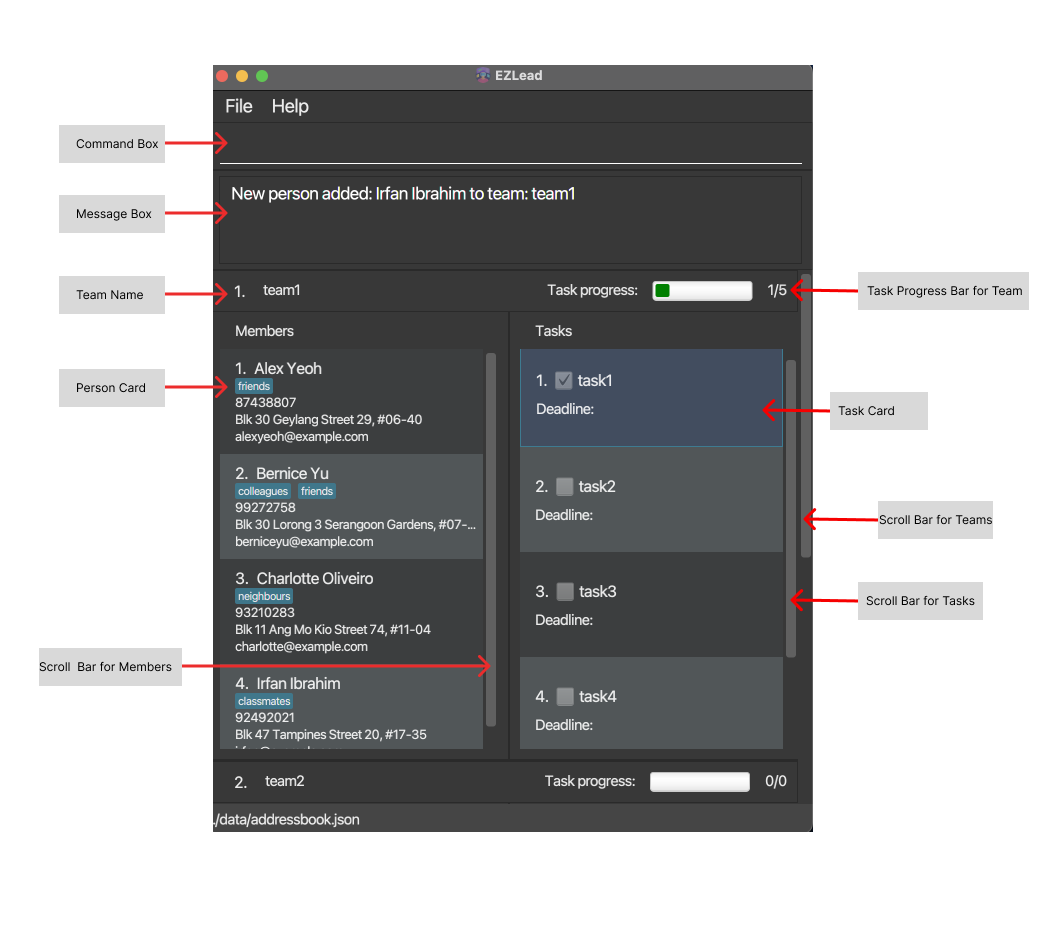
EZLead Main Window
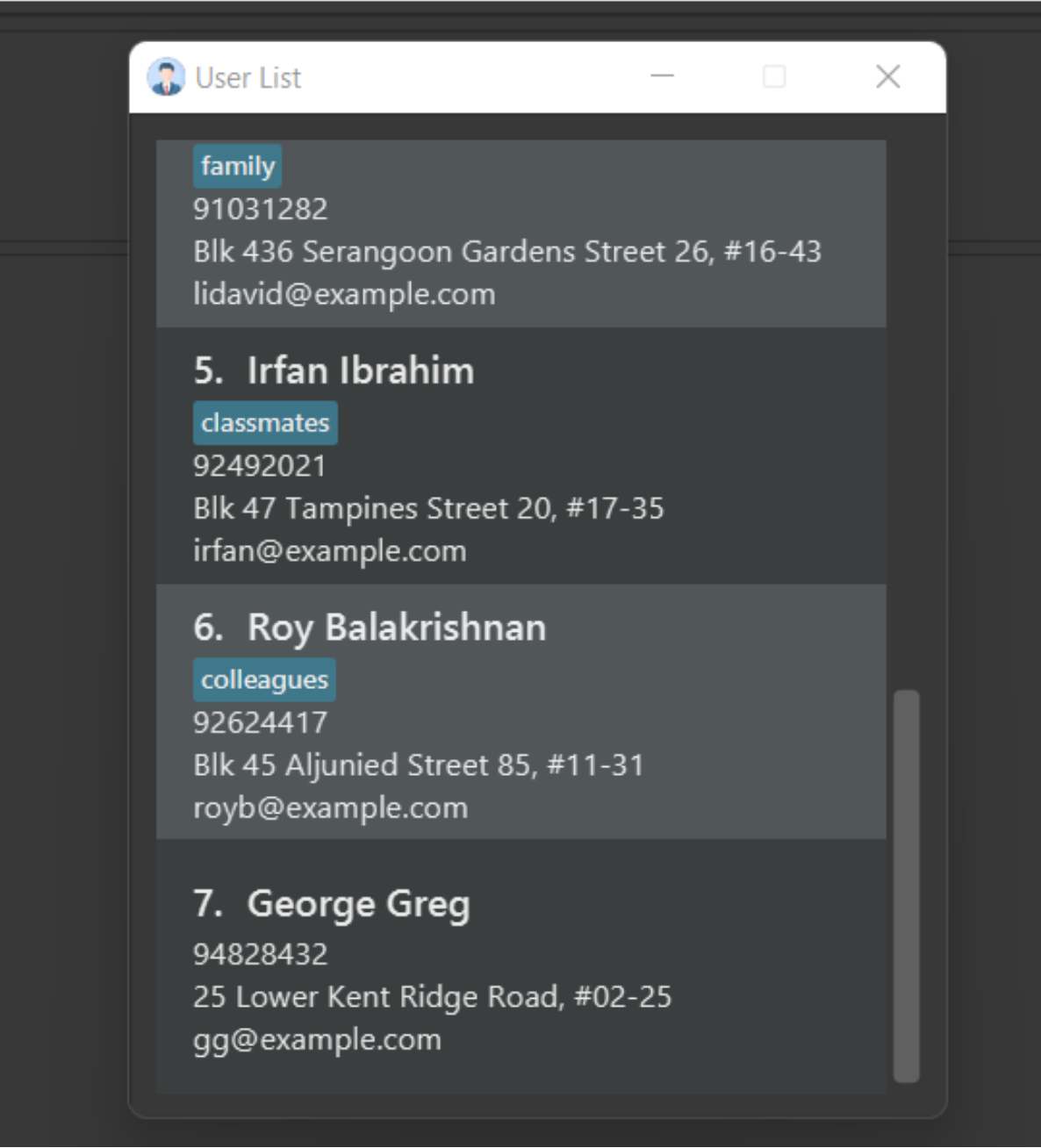
User List
Quick Start
Here is a quick overview of how to get our application started! Complete these few steps to get your EZLead journey started!
- Ensure that you have Java
11installed in your computer. You can check your java version using thejava -versioncommand. - Download the latest EZLead.jar from here.
- Create a home folder for your EZLead app wherever you wish to store it and copy the jar file to it.
- Double-click the file to start the app. The app will contain some sample data.
- Type the command in the command box and press Enter to execute it.
Some example commands you can try:-
userlist: Shows the global list of all members and their details. -
add n/John Doe p/99853657 e/john@gmail.com a/414, North Bridge Ave 5, #09-86 t/friends t/owesMoney: Adds a member namedJohn Doeto the app. -
delete p/2: Deletes the 2nd member shown in the global member list. -
clear: Deletes all teams, members and tasks. -
exit: Exits the app.
-
- Refer to the Features section in this user guide for more details on commands
Features
Notes about the commands:
-
Words in
UPPER_CASEare the parameters to be supplied by the user.
e.g. increate t/TEAM-NAME,TEAM-NAMEis a parameter which can be used ascreate t/UIDevelopers. -
Items in square brackets are optional. e.g
n/NAME [t/TAG]can be used asn/John Doe t/friendor asn/John Doe. -
Items with
… after them can be used multiple times including zero times.
e.g.[t/TAG]…can be used asm/John,m/John m/Janeetc. -
If a parameter is expected only once in the command but you specified it multiple times, only the last occurence of the parameter will be taken. e.g. if the command specifies
task/1 task/2, onlytask/2will be taken. -
Commands are case-sensitive. e.g. You cannot enter HeLp instead of help
-
The command keyword (e.g.
add,create,taskeditetc.) and parameters without a prefix must be put in front (i.e. follow the format given). However, parameters with a prefix can be placed in any order (i.e. foredit,edit 1 n/John p/12345678andedit 1 p/12345678 n/Johngives the same result).
Parameters Summary
Here is a summary of all the parameters used in EZLead commands:
| Parameter | Refers to | Required format |
|---|---|---|
| NAME | The name of the member. | It should only contain alphanumeric characters and spaces, and should not be blank. |
| PHONE-NUMBER | The phone number of the member. | It should only contain numbers, is exactly 8 numbers long, and should not be blank. |
| The email of the member. | It should follow the local-part@domain format and should not be blank. | |
| ADDRESS | The address of the member. | It can take any value, but it should not be blank. |
| TAG | Additional information about the member. | It should only contain alphanumeric characters, or it can be blank. |
| GLOBAL-PERSON-INDEX | The index number of the member as shown in the userlist window. | It must be a positive integer (e.g. 1, 2, 3, …) and cannot be more than the maximum integer value (i.e 2147483647). Otherwise it will be considered invalid. |
| MEMBER-INDEX | The index number of the member as shown in the userlist window | It must be a positive integer (e.g. 1, 2, 3, …) and cannot be more than the maximum integer value (i.e 2147483647). Otherwise it will be considered invalid. |
| TEAM-NAME | The name of the team. | It should only contain alphanumeric characters, spaces, and parentheses. But it should not be blank. |
| TEAM-INDEX | The index of the team as shown in the main window. | It must be a positive integer (e.g. 1, 2, 3, …) and cannot be more than the maximum integer value (i.e 2147483647). Otherwise it will be considered invalid. |
| TASK-NAME | The name of the task. | It should only contain alphanumeric characters, spaces, parentheses, and the apostrophe. But it should not be blank. |
| DEADLINE | The deadline of the task. | It should be a valid date in DD-MM-YYYY format. |
| TASK-INDEX | The index of the task as shown in the task list of the team in the main window. | It must be a positive integer (e.g. 1, 2, 3, …) and cannot be more than the maximum integer value (i.e 2147483647). Otherwise it will be considered invalid. |
1. Person Features
Note:
Open the User List window before using any Person Features
1.1 Viewing all members: userlist
Opens the User List window.
Format: userlist
1.2 Listing all members : list
Shows a list of all members in the User List window.
Format: list
1.3 Adding a member: add
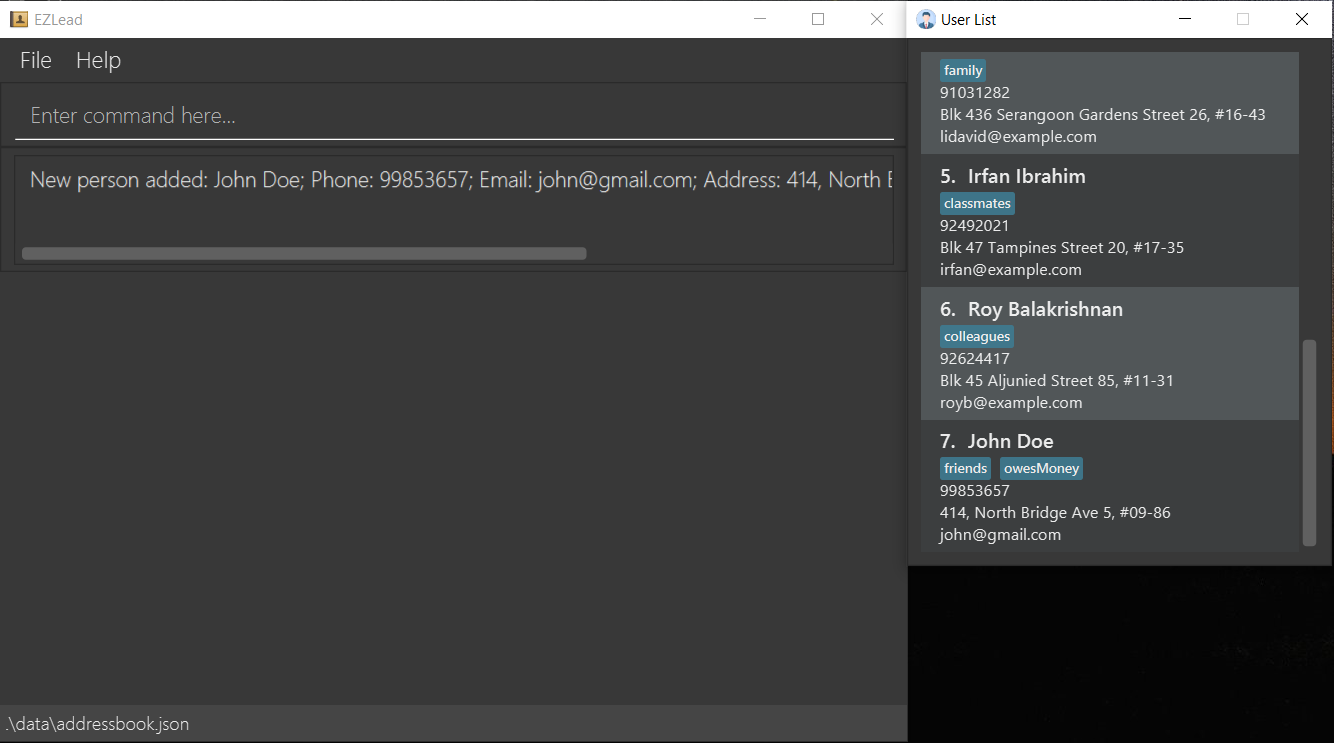
Adds a new member to EZLead. The new member will be shown in the User List window.
Format: add n/NAME p/PHONE-NUMBER e/EMAIL a/ADDRESS [t/TAG]…
Examples:
-
add n/John Doe p/99853657 e/john@gmail.com a/414, North Bridge Ave 5, #09-86 t/friends t/owesMoneyAdds a new member with the following details to the global member list.
1.4 Editing a member’s details: edit
Edits a member’s details. Require at least one optional parameters. The edited member’s details will be reflected both in the User List window and in the Person Card (Refer to the GUI) of the teams that the member is assigned to.
Format: edit GLOBAL-PERSON-INDEX [n/NAME] [p/PHONE-NUMBER] [e/EMAIL] [a/ADDRESS] [t/TAG]…
Examples:
-
edit 1 n/Johny p/91234567 e/johndoe@example.comEdits the first member’s name in the global member list to Johny, email to johndoe1@example.com and contact number to 91234567.
1.5 Deleting a member: delete
Deletes a member. The deleted member will be removed from the User List window.
Format: delete p/GLOBAL-PERSON-INDEX
Examples:
-
delete p/1Deletes the first member.
1.6 Locating members by name: find
Finds members whose names contain any of the given keywords. Results would be reflected in the user list window.
Format: find KEYWORD [MORE_KEYWORDS]
- The search is case-insensitive. e.g
hanswill matchHans - The order of the keywords does not matter. e.g.
Hans Bowill matchBo Hans - Only the name is searched.
- Only full words will be matched e.g.
Hanwill not matchHans - Persons matching at least one keyword will be returned (i.e.
ORsearch). e.g.Hans Bowill returnHans Gruber,Bo Yang
Examples:
-
find PamreturnsPamellaandPam Doe -
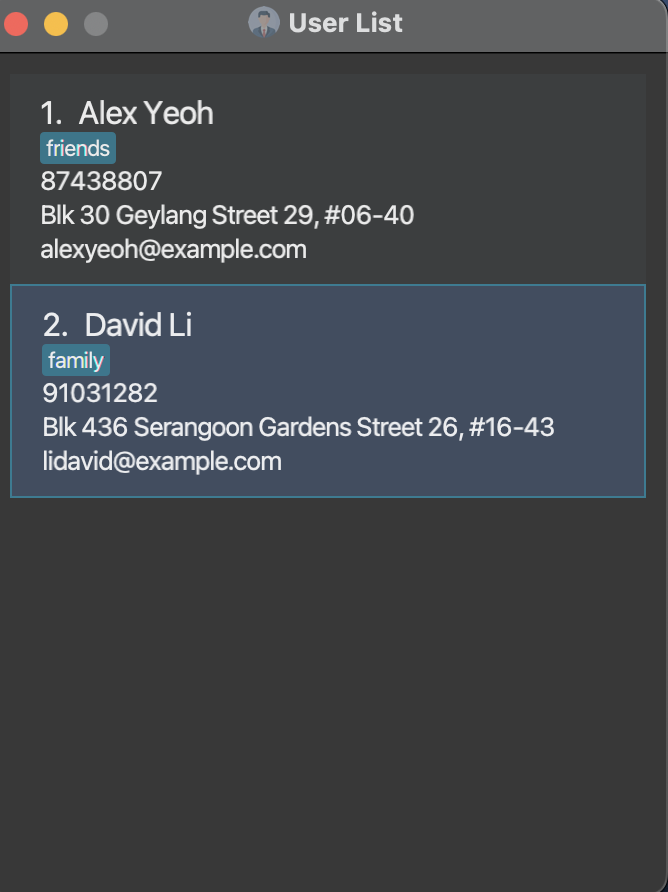
find alex davidreturnsAlex YeohandDavid Li
2. Team Features
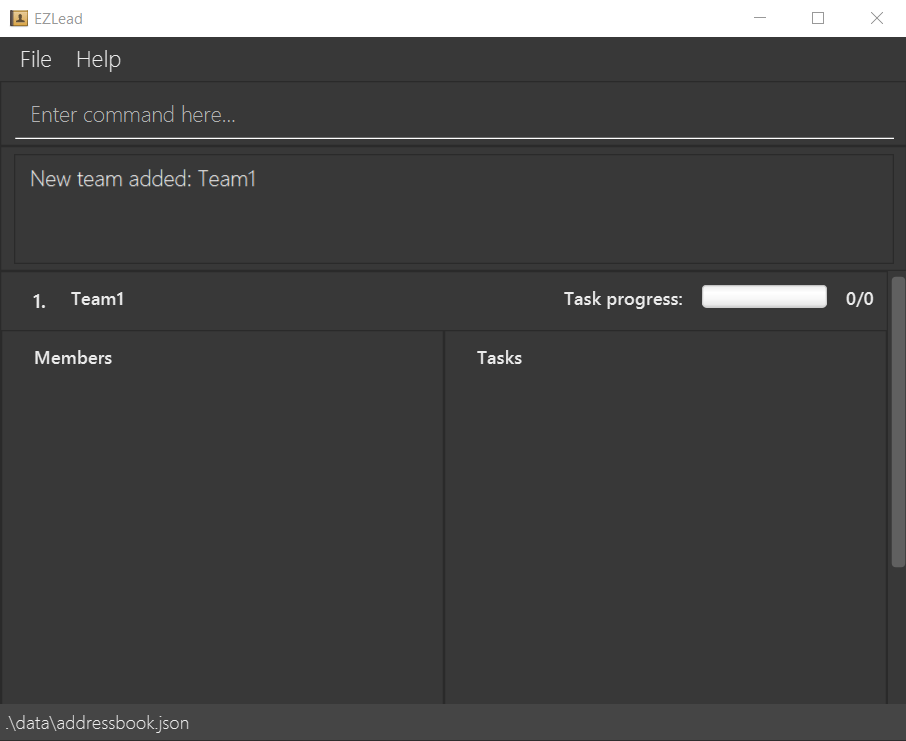
2.1 Adding a team: create
Adds a team with the given name to EZLead.
Format: create n/TEAM-NAME
Examples:
-
create n/Team1Adds a team with the name Team1.
Note:
Names should only contain alphanumerical characters and spaces, and it should not be blank
2.2 Deleting a team: delteam
Deletes the given team from EZLead.
Format: delteam TEAM-INDEX
Examples:
-
delteam 1Deletes the first team.
2.3 Changing a team’s name: editteam
Changes a team’s name (specified by index) to the given name.
Format: editteam t/TEAM-INDEX n/TEAM-NAME
Examples:
-
editteam t/1 n/TEAMNEWChanges the first team’s name to ‘TEAMNEW’.
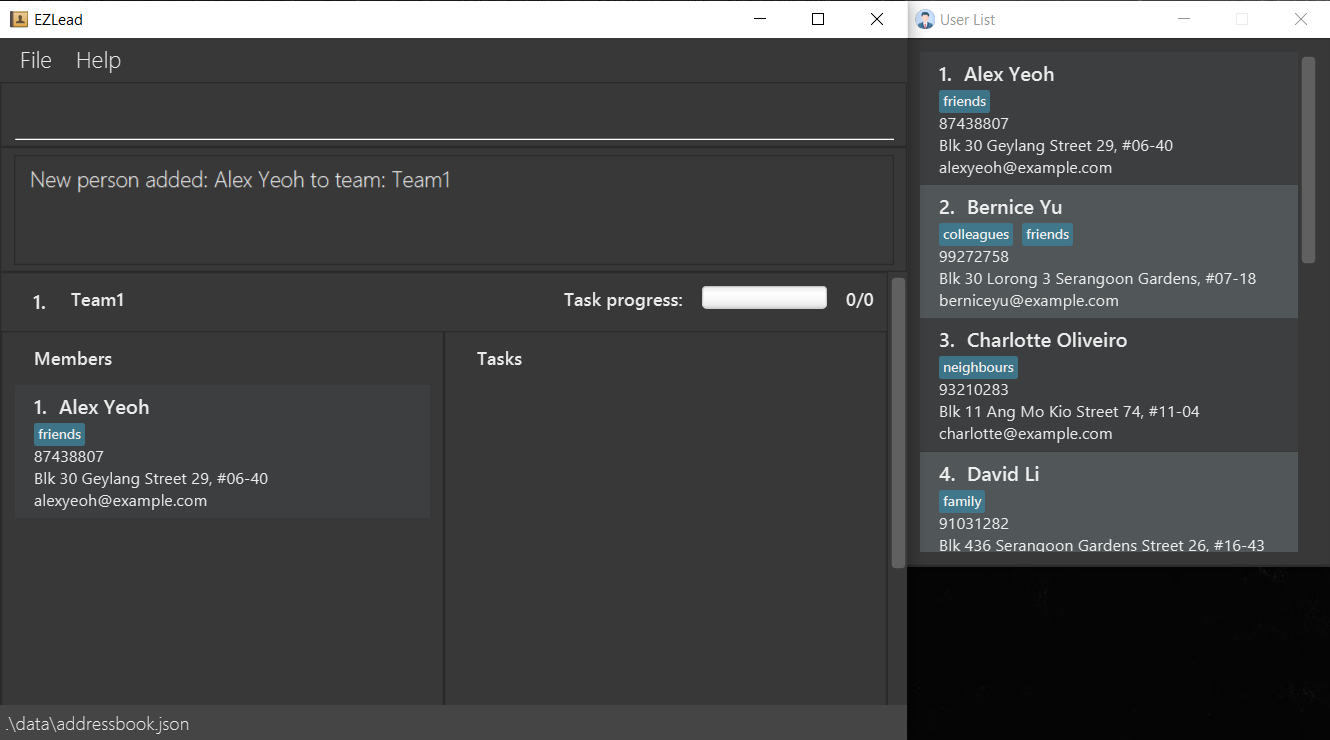
2.4 Assigning a member to a team: assign
Assigns a member to a team.
Format: assign m/MEMBER-INDEX t/TEAM-INDEX
Note:
MEMBER-INDEX is the index from the User List (refer to Viewing all members section above).
Examples:
-
assign m/1 t/1Assigns the first member in the global member list to the first team.
2.5 UnAssigning a member to a team: unassign
removes a member from a team.
Format: unassign m/MEMBER-INDEX t/TEAM-INDEX
Note:
MEMBER-INDEX is the index from the User List (refer to Viewing all members section above).
Examples:
-
unassign m/1 t/1removes the first member in the global member list from the first team.
3. Task Features
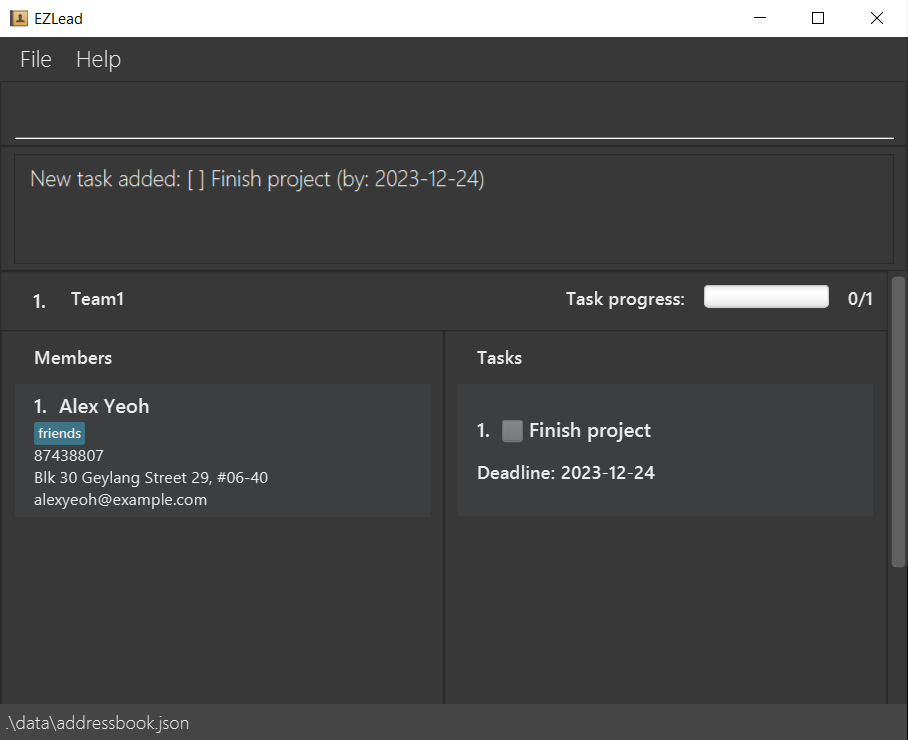
3.1 Adding a task: taskadd
Adds a new task to a team. Additionally, you may opt to provide a deadline for the task.
Format: taskadd t/TEAM-INDEX n/TASK-NAME [d/DEADLINE]
Examples:
-
taskadd t/1 n/Finish project d/24-12-2023Adds a new task to team with index 1 with the description “Finish project”. The deadline set here is 24 December 2023.
3.2 Deleting a task taskdelete
Deletes a task in a specific team.
Format: taskdelete t/TEAM-INDEX task/TASK-INDEX
Examples:
-
taskdelete t/1 task/1Deletes the first task in the first team.
3.3 Marking a task as completed taskmark
Marks a task as completed.
Format: taskmark t/TEAM-INDEX task/TASK-INDEX
Examples:
-
taskmark t/1 task/1Marks the first task in the first team as completed.
3.4 UnMarking a task taskunmark
Marks a task as pending.
Format: taskunmark t/TEAM-INDEX task/TASK-INDEX
Examples:
-
taskunmark t/1 task/1Marks the first task in the first team as pending.
3.5 Updating a task description: taskedit
Updates a task’s description. Require at least one of the optional parameters.
Format: taskedit t/TEAM-INDEX task/TASK-INDEX [n/TASK-NAME] [d/DEADLINE]
Examples:
-
taskedit t/1 task/1 n/Finish assignment d/12-12-2022Updates the first task in the first team with new description ‘Finish assignment’. Adding a deadline to the task is optional.
TIP:
- To add deadline to an already existing task, use the command
taskedit t/TEAM-INDEX task/TASK-INDEX d/NEW DD-MM-YYYY
4. General Features
4.1 Viewing help: help
Shows a message explaining how to access the help page.

Format: help
4.2 Clearing all entries : clear
Clears all entries from the user list, team list and task list.
Format: clear
Manually editing save file
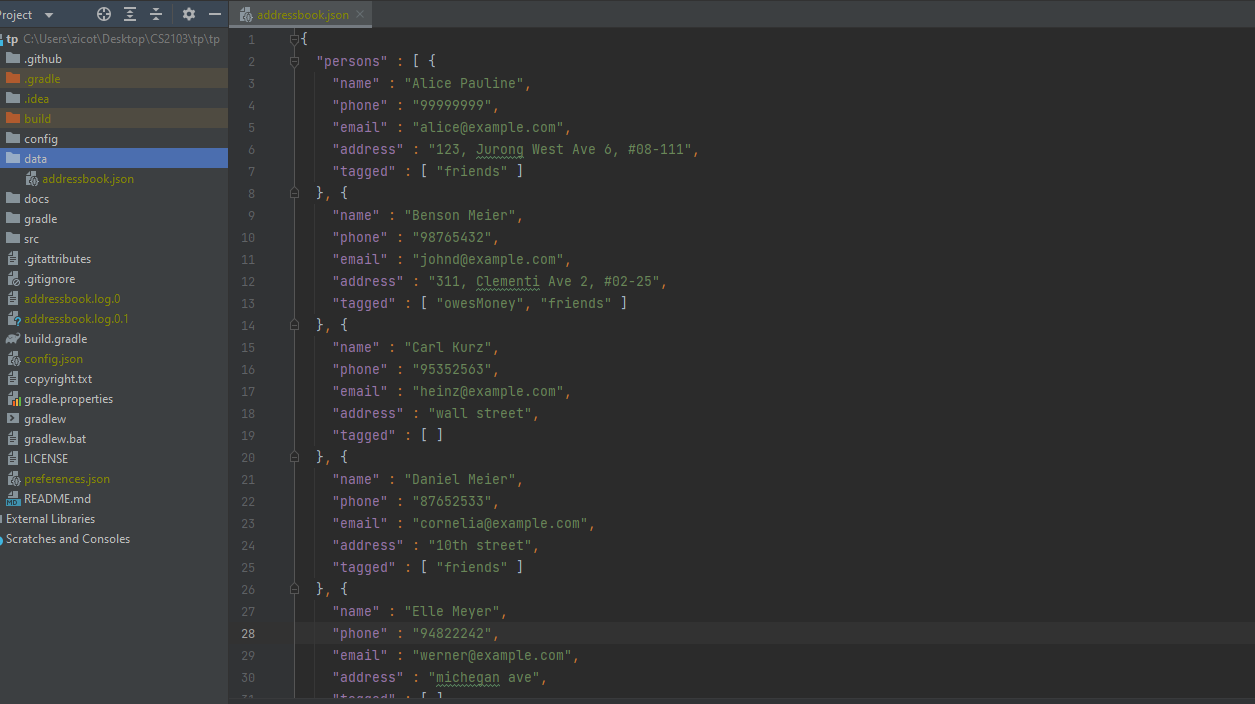
For advanced users, the data and state of EZLead is stored in data/addressbook.json.
You can manually modify the data directly by accessing this JSON file.
However, EZLead cannot verify validity of the data if it was manually modified. Any invalid data will cause EZLead to load in an EMPTY state.
Glossary
Read this section to find out more about certain terms that might confuse you
| Term | Description |
|---|---|
| CLI | Command Line Interface - text based user interface (UI) used to run programs, manage computer files and interact with the computer. |
| Command | Instruction from user to application to perform a service |
| Feature | A distinct functionality of EZLead |
| GUI | Graphical User Interface - allows users to interact with electronic devices through graphical icons and audio indicators. |
| Index | A unique number that is used to refer to data (team, member, task etc.) |
| JAR File | Java ARchive - It’s a file format used for aggregating many files into one. The EZLead jar file contains all of EZLeads file and can be run on your computer |
| Keyword | words used at the start of a command e.g. add
|
| Parameter | The data that follows the Keyword and the prefix and is passed to application |
| Prefix | A letter with a slash (e.g. n/) which allows EZLead to recognise what data you are entering and thus how to process it. |
| Task | A project or any kind of work to be completed by a team |
| Team | A group of members working together on a certain task or project |
| Tech Lead | Project manager or leader in a tech company |
FAQ
Q: What should be the index of the member to be specified to assign and unassign members from a team?
A: You can use the index of the member provided in the user list. You can access user list by using the command userlist.
Q: Will I lose my data when the app is closed?
A: No you will not lose any data. The data is stored and will be displayed even after closing and reopening the app.
Q: Do we need an internet connection to use this app?
A: No. Currently, you do not need internet to use this app.
Command Summary
| Action | Format | Examples |
|---|---|---|
| Help | help |
|
| Member Add | add n/NAME p/PHONE e/EMAIL a/ADDRESS [t/TAG]… |
add n/John Doe p/99853657 e/john@gmail.com a/414, North Bridge Ave 5, #09-86 t/friends t/owesMoney |
| Member Delete | delete p/GLOBAL-PERSON-INDEX |
delete p/1 |
| Member Edit | edit GLOBAL-PERSON-INDEX [n/NAME] [p/PHONE] [e/EMAIL] [a/ADDRESS] [t/TAG]… |
edit 1 n/Johny p/91234567 e/johndoe@example.com |
| Member List | userlist |
|
| Team Add | create n/TEAM-NAME |
create n/TEAM1 |
| Team Delete | delteam TEAM-INDEX |
delteam 1 |
| Team Edit | editteam t/TEAM-INDEX n/TEAM-NAME |
editteam t/1 n/TEAMNEW |
| Member assign | assign m/MEMBER-INDEX t/TEAM-INDEX |
assign m/1 t/1 |
| Member unAssign | unassign m/MEMBER-INDEX t/TEAM-INDEX |
unassign m/1 t/1 |
| Task Add | taskadd t/TEAM-INDEX n/TASK-NAME [d/DEADLINE] |
taskadd t/1 n/Finish project d/24-12-2023 |
| Task Delete | taskdelete t/TEAM-INDEX task/TASK-INDEX |
taskdelete t/1 task/1 |
| Task Mark | taskmark t/TEAM-INDEX task/TASK-INDEX |
taskmark t/1 task/1 |
| Task unMark | taskunmark t/TEAM-INDEX task/TASK-INDEX |
taskunmark t/1 task/1 |
| Task Edit | taskedit t/TEAM-INDEX task/TASK-INDEX [n/TASK-NAME] [d/DEADLINE] |
taskedit t/1 task/1 n/Finish assignment d/12-12-2022 |